Android App

Fravora: Digital Photo Frame
for Android devices

Turn any Android device into a smart digital photo frame with Google Photos slideshow support, offline local and NAS playback, built-in radio, live weather, and voice control. Ideal for tablets, phones, Fire tablets, TV and display devices, with support for Synology and QNAP NAS plus Google Photos, Microsoft OneDrive, Dropbox, and Immich. No subscription required and no forced slideshow ads.

No forced ads Photos stay local NAS/SMB support Works offline

Why people choose Fravora

Fravora is an Android digital photo frame app for people who want to repurpose an existing Android device instead of buying another screen. It is built for always-on home displays, kitchen counters, wall-mounted tablets, repurposed phones, Fire tablets, and dedicated smart frame setups where reliability matters more than social features. Many users land here after testing frame apps that interrupt slideshows with ads, hide useful settings behind subscriptions, or require uploading personal photos to a third-party cloud.

With Fravora, you can run a Google Photos slideshow, mix in local folders or SMB network shares from Synology and QNAP NAS devices, and keep an offline photo frame running even when internet drops. You also get built-in radio, live weather, clock and metadata overlays, hidden photo controls, and optional voice commands, while keeping your photos under your control.

Search-friendly answers

Built for the way people search

Best digital photo frame app

Fravora is designed as an appliance-style frame app: local-first photos, no forced ads, no subscription requirement, and schedule-based playback for always-on screens. It works with local folders, NAS/SMB shares, Google Photos, and other supported cloud sources.
Google Photos slideshow app for Android

Use Google Photos as one of your slideshow sources alongside local folders and SMB/NAS shares. Fravora is built for users who want cloud convenience without losing local-first options.

Voice-controlled slideshow app

Use wake phrase and voice commands to manage slideshow and radio hands-free. Fravora keeps the screen clean while still giving you direct control across the room.

Offline photo viewer for Android

Fravora runs fully offline when using local folders or SMB/NAS on your network. That makes it ideal for privacy-focused setups and homes with unstable internet.

Smart photo frame alternative

Instead of buying dedicated hardware, repurpose the Android tablet, Fire tablet, or Android display device you already own. Fravora gives you smart overlays, scheduling, and reliable playback in one app.

Your memories, beautifully framed

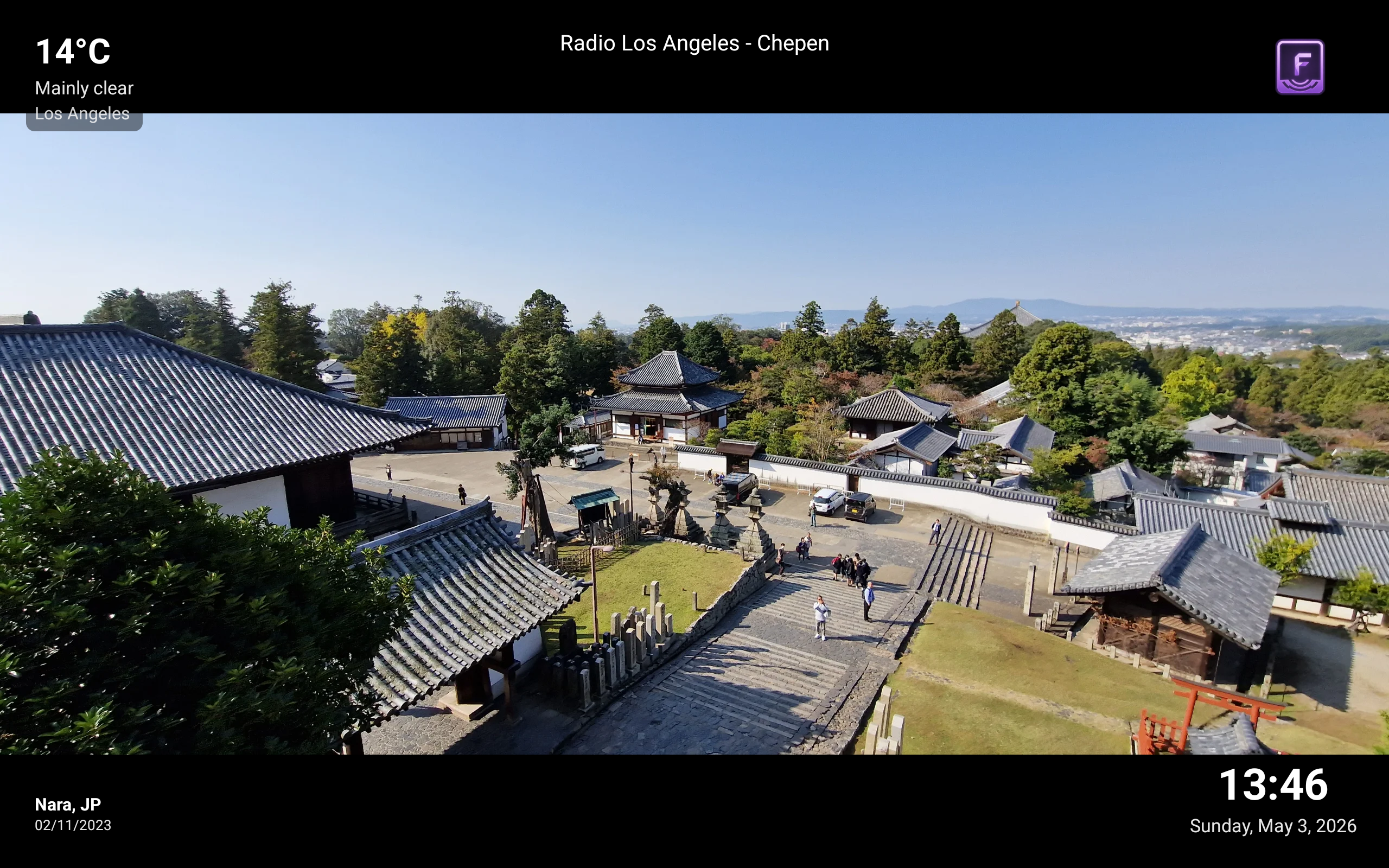
Android digital photo frame app screenshot showing Nara, Japan with weather and time overlays

Nara, Japan — weather overlay, clock, and now-playing radio info all in one glance

Guides for repurposing Android devices

View all articles →

Full control

Every detail, your way

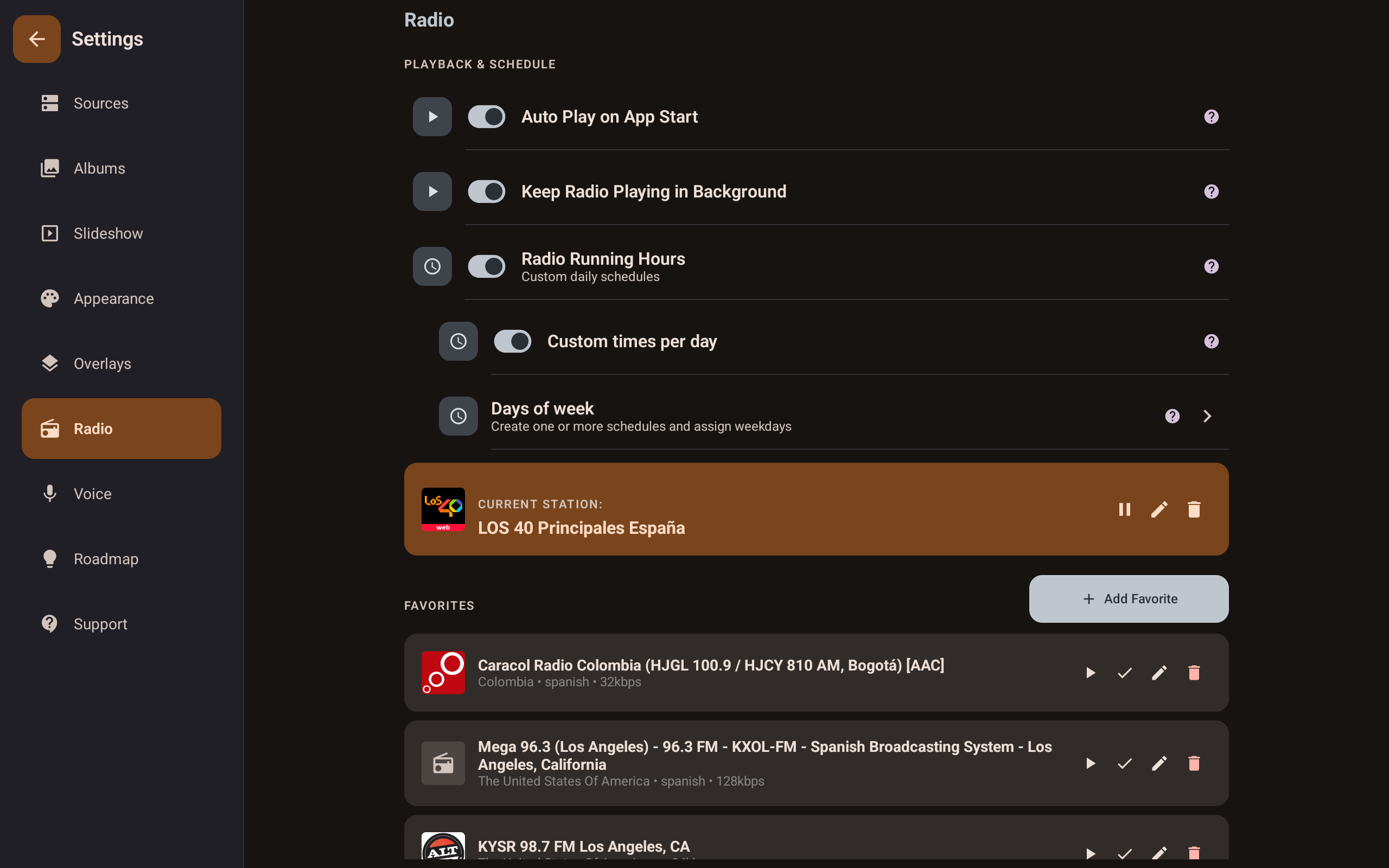
Fravora Android photo frame app radio settings screen showing station favourites and scheduling

Radio & favourites

Save favourite stations, schedule when radio plays each day, and keep music going in the background — all in one place.

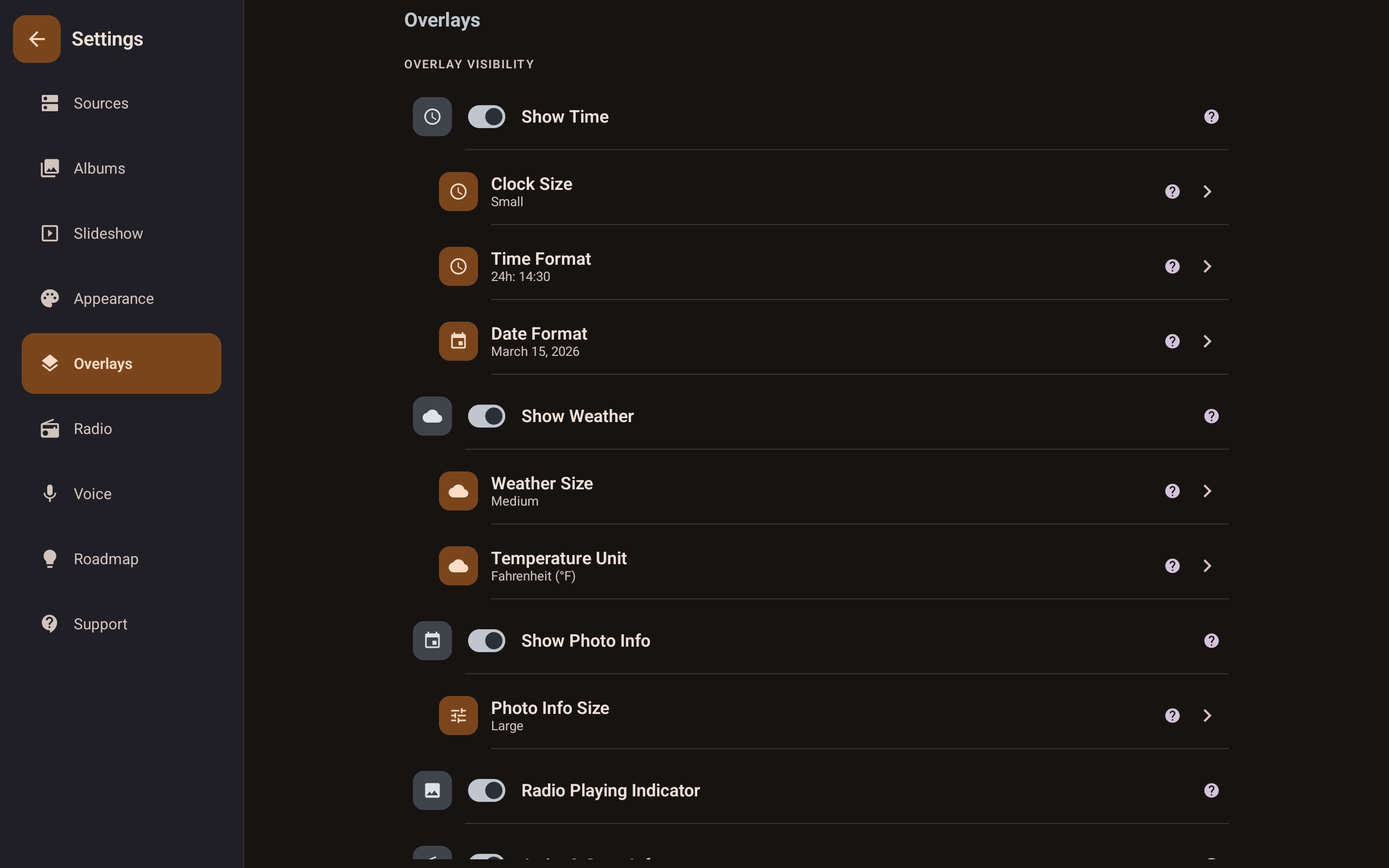
Fravora Android photo frame app overlays settings screen showing time, weather, and photo info toggles

Overlay visibility

Toggle weather, clock, photo metadata, and now-playing info individually. Choose exact sizes for each element.

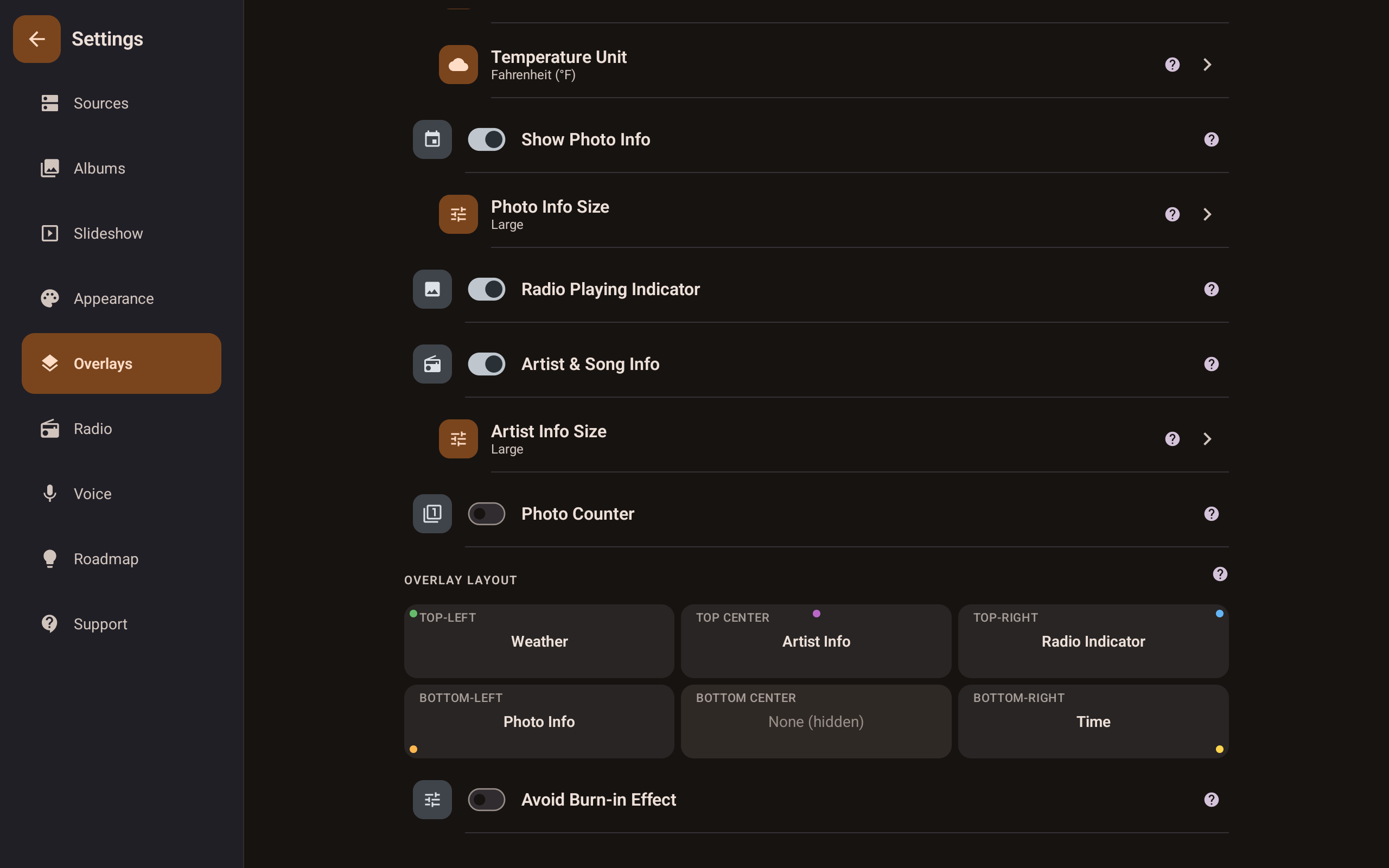
Fravora Android photo frame app overlay layout settings showing a 2x2 corner assignment grid

Overlay layout

Assign weather, clock, metadata, and ambient logo across a 2x2 corner grid with collision-safe swaps and optional hide states.

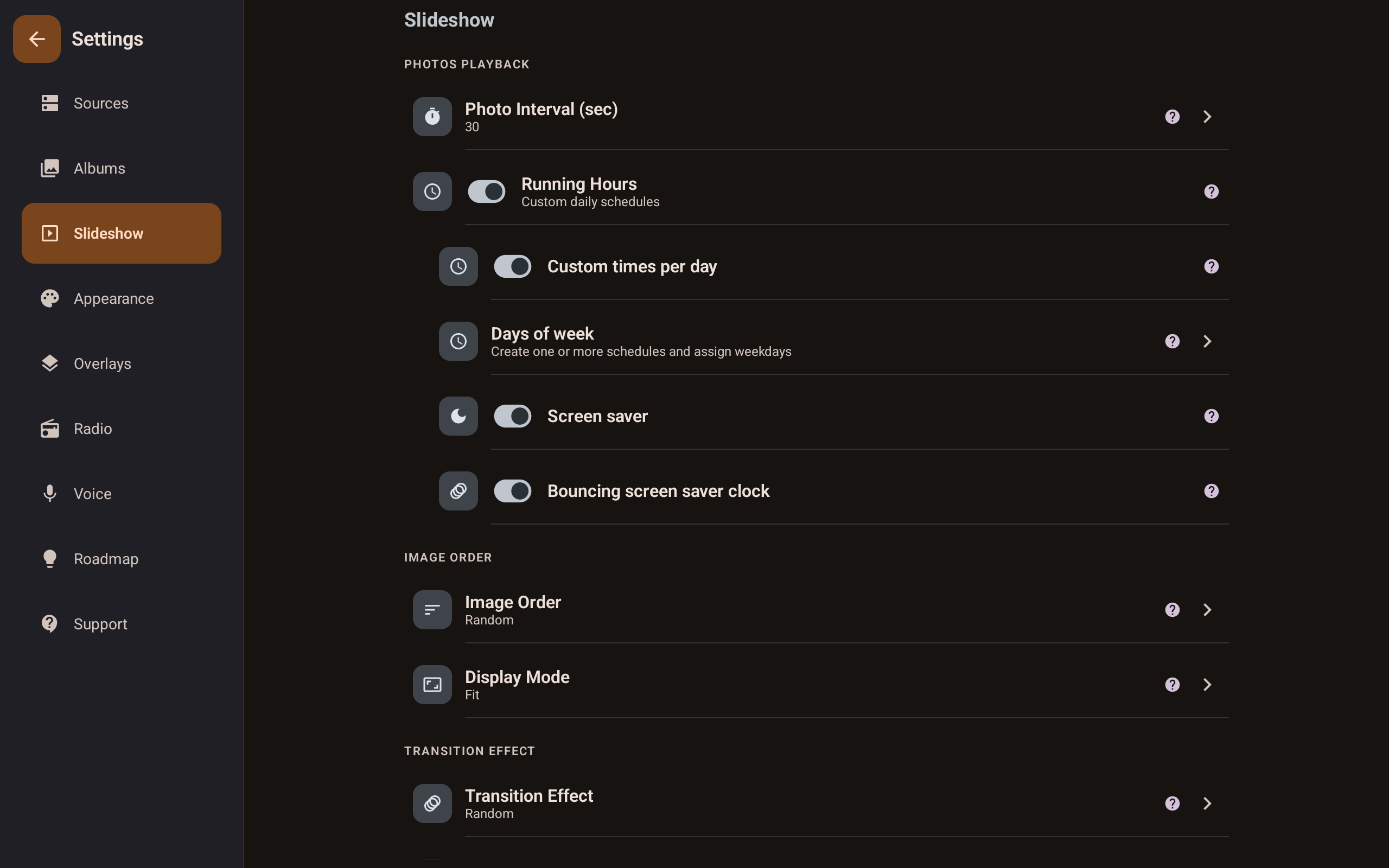
Fravora Android photo frame app slideshow settings showing photo interval, order, transitions, and screen saver options

Slideshow & scheduling

Set photo intervals, display mode, transition effects, and running hours with per-day schedules. Set it once and forget it.

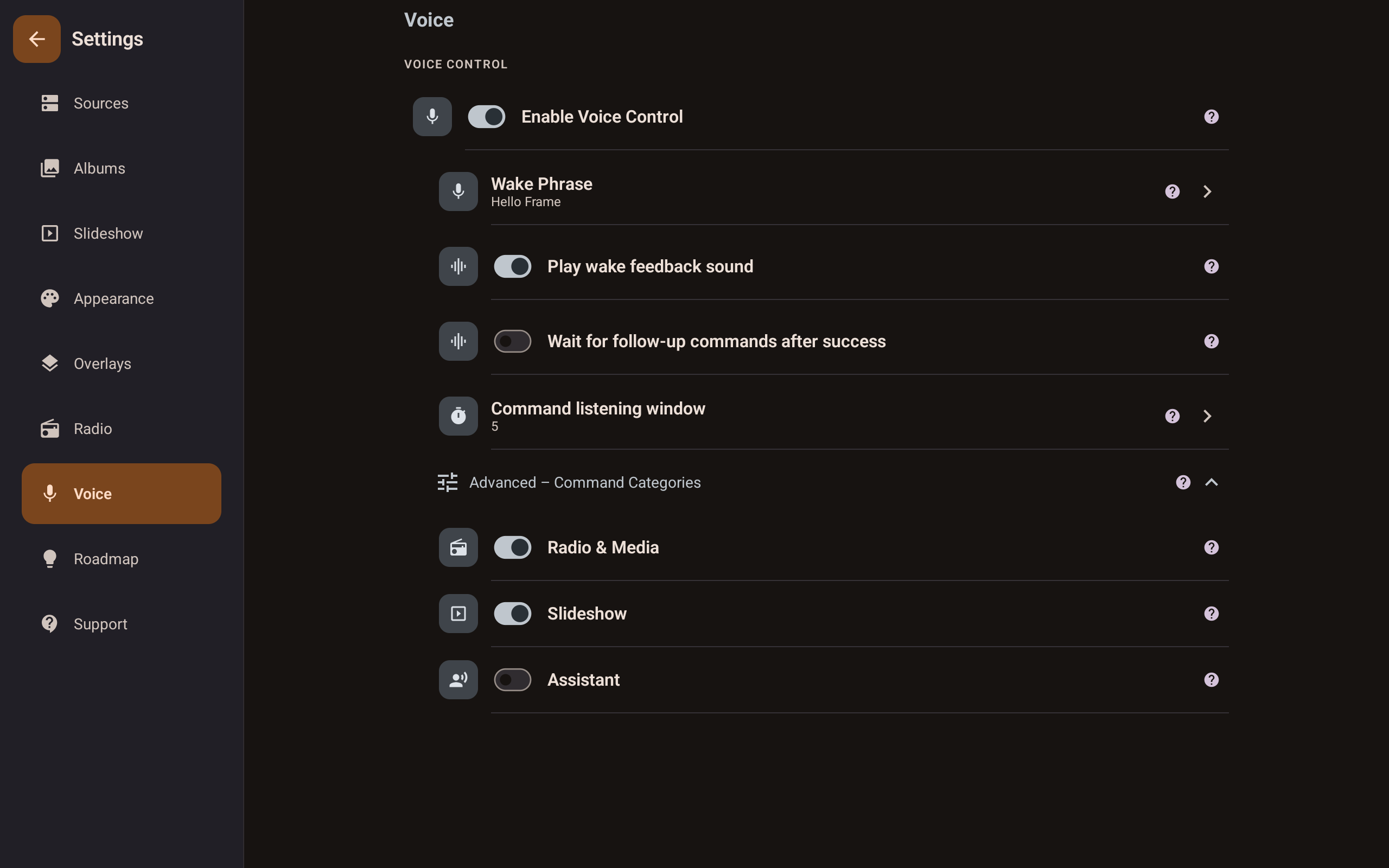
Fravora Android photo frame app voice control settings showing wake phrase, command categories, and listening window

Voice control

Wake phrase detection runs on-device; command recognition uses Android speech recognition. Tune the listening window and enable radio, slideshow, or assistant categories.

What it does

Everything your idle screen deserves

🖼️

Smart Slideshow

Local folders, SMB/NAS shares, and supported cloud providers including Google Photos, Microsoft OneDrive, Dropbox, and Immich in one uninterrupted slideshow.

Open manual chapter →
📻

Built-in Radio

Stream radio stations while your photos play. Music and memories, together.

Open manual chapter →
🌤️

Weather Overlay

Live local weather at a glance, right on your frame, alongside clock and photo info overlays. No extra device needed.

Open manual chapter →
🎙️

Voice Control

Wake-phrase detection runs on-device with OpenWakeWord; command recognition uses Android SpeechRecognizer with clear visual feedback.

Open manual chapter →
📍

Metadata Overlay

Date and location pulled from EXIF — privately, locally, beautifully.

Open manual chapter →

Smart Scheduling

The frame turns on and off on your schedule. Set it once, forget it.

Open manual chapter →
📅

Calendar (Pro)

Tap the clock/date overlay to open a full-screen calendar with events, recurrence, and reminders.

Open manual chapter →
☁️

Cloud Sources

Supported cloud sources: Google Photos, Microsoft OneDrive, Dropbox, and Immich. Free includes 1 cloud connection with base limits; Pro expands cloud limits across all supported cloud providers.

Open manual chapter →
🙈

Hidden Photos

Hide photos per album or globally without deleting. Unhide anytime.

Open manual chapter →

Built to stay out of your way

🚫

No forced ads

Watch one voluntarily for Pro time. Your slideshow is never interrupted.

📡

Works offline

Local and SMB sources need no internet. Your frame keeps running.

🔐

Your photos stay yours

Nothing uploaded. Credentials encrypted locally. Nothing sold.

Appliance-grade reliability

Runs 24/7 unattended. Set it up once — it just works.

☁️

Local + NAS, one frame

Mix local folders and SMB/NAS in a single setup.

🎛️

No subscription pressure

Free tier is genuinely usable, and Pro is a one-time upgrade when you want more.

Plans

Free to start, Pro when you're ready

Feature Free Pro
Photo Sources
Local & SMB / NAS folders
Cloud sources (Google Photos, OneDrive, Dropbox, Immich)1 cloud connection + base limitsExpanded cloud limits and provider scope
Subfolders & expanded limits
Slideshow
Uninterrupted slideshow + scheduling
Smart Shuffle, transitions & speed control
Image backdrop style (Fit mode)
New images overlay badge & viewer
Radio
Radio streaming
Favorites, background playback & scheduling
Lockscreen & notification controls
Overlays
Clock overlay
Weather, metadata & now playing
Full-screen weather forecast (24h/7d)
Positioning, themes & anti-burn-in
Calendar overlay, events & reminders
Android/Google TV & Fire TV support
Controls & Pro
Voice control
Assistant volume voice commands
Unlock Pro via optional ad
One-time Pro purchase

I built Fravora because every other frame app I tried interrupted my slideshow with paywalls, forced ads, or required a cloud subscription just to show photos from my own NAS. I wanted something that felt like an appliance — reliable, respectful, and beautiful. So I made it.

aniujual Solo developer, Fravora

FAQ

Common questions

Yes. Fravora supports Google Photos as a cloud source alongside local folders, SMB/NAS shares, Microsoft OneDrive, Dropbox, and Immich.
Only if you choose to. Free users can watch a rewarded ad for temporary Pro access — the slideshow itself is never interrupted.
Yes. Fravora can display live weather, a clock, photo metadata, and now-playing radio information over your slideshow.
Yes. Local and SMB/NAS sources work without internet. Scheduling and screen saver keep running as configured.
Yes. Fravora works as an offline NAS photo frame when using local folders or SMB/NAS sources on your local network. Internet is only needed for cloud sources and online services like radio.
Yes, on the free tier. Enter your share credentials in the app and pick which folders to include.
No. Photos are read from your local or SMB/NAS sources and never sent to Fravora servers.
It uses Google's Speech Recognition, which requires ongoing maintenance. Keeping it Pro helps sustain the free tier without forced ads.
Android tablets and dedicated Android display devices. Works best mounted or docked for always-on frame setups.
Install Fravora, add local folders or NAS/SMB sources, choose slideshow interval, then dock your tablet and enable always-on display settings.
Yes. Fravora supports wake phrase and voice commands so you can control slideshow and radio without touching the screen.
Absolutely. Older Android tablets work well as dedicated frame displays, especially with Fravora offline playback and scheduling.
Yes. Fravora connects to Synology and QNAP NAS over standard SMB shares, so your photos can stay on your local network while the slideshow runs offline.
If you want a free Android photo frame app with no forced slideshow ads, offline playback, and NAS support, Fravora's free tier is built for that use case.
Yes, on compatible Amazon Fire tablets. Fravora can run as a dedicated photo frame display with local folders, NAS/SMB sources, and scheduled playback.
No. Fravora works as an offline digital photo frame using local folders and SMB/NAS shares, so you can run it without a cloud subscription.

Ready to bring your photos to life?

Free to download. No account required. Works in minutes.

Get it on Google Play Get it on Amazon Appstore User Manual Privacy Policy Download Guide Data Deletion